
Spaceman Desktop includes a dedicated Spaceman Web submenu under Management Reports, containing reports for activity generated through Spaceman Shop and Spaceman Portal.
Go to: Spaceman Desktop → Reports → Management Reports → Spaceman Web
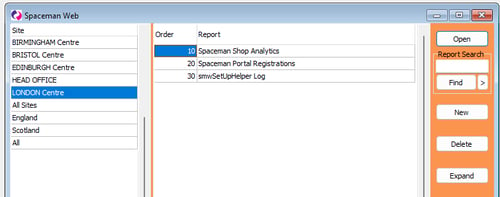
The following reports are available:
- Spaceman Shop: Analytics — Spaceman Shop activity over a chosen date range
- Spaceman Portal Registrations — Spaceman Portal customer registrations
- smwSetUpHelper Log — installer log for support use
Spaceman Shop: Analytics
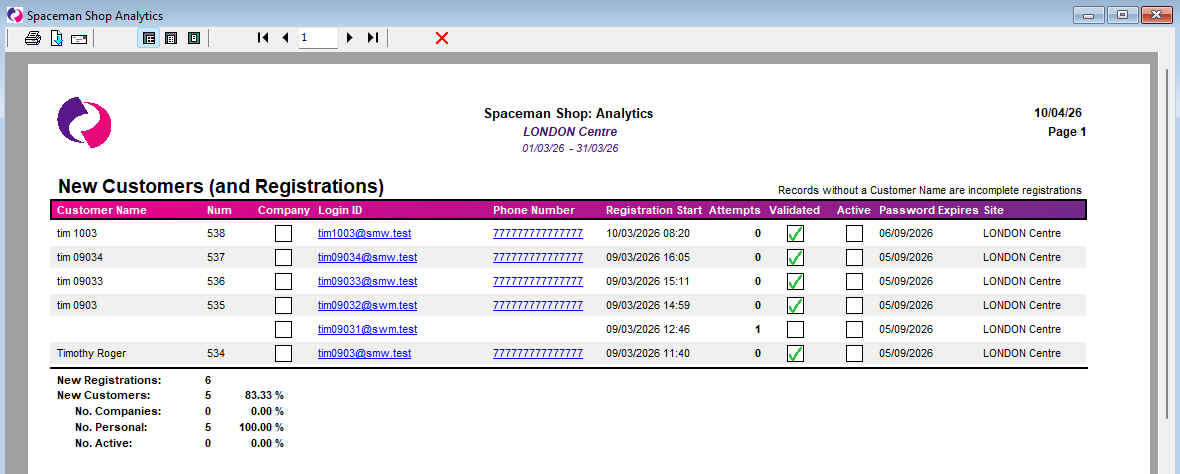
This report provides a clear picture of all activity generated through Spaceman Shop during a chosen date range, covering new customer registrations, contracts, reservations, and financial transactions.
- Select a Date From and Date To to define the reporting period
- Run the report — results are organised into four sections
1. New Customers (and Registrations)
Lists all Spaceman Portal and Spaceman Shop registrations started during the date range. Each row shows: Customer Name, Login ID, Attempts, Registration Start, Validated, Active, Password Expires, Phone Number, and Site.
Rows without a Customer Name are incomplete registrations — the customer started but did not finish the process. Summary totals show: New Registrations, New Customers, No. Companies, No. Personal, and No. Active.
2. New Contracts
Lists all contracts created through Spaceman Shop during the date range. Each row shows: No., Start Date, Created date, Units, Customer No., Signed (date), Insurance Added, Invoice Frequency, and Payment Method. Summary totals show: New Contracts, No. Signed, Ins. Purchased, Ins. Declined, and Ins. Own.
3. New Reservations
Lists all reservations made through Spaceman Shop during the date range. Each row shows: Expected Move In, Sizecode, Unit, Deposit, Valid Until, Status, and Date. Summary totals show: Taken Up, Cancelled, Expired, Active, and Total Deposits.
4. New Transactions
Lists all invoices and financial documents generated through Spaceman Shop during the date range. Each row shows: Doc Ref, Type, Net, VAT, Gross, and Linked To (where C = Contract No., R = Reservation No.).
Spaceman Portal Registrations
This report lists all customer registrations for Spaceman Portal. Use it to monitor registration activity, identify incomplete registrations, and review customer account status across your sites.
smwSetUpHelper Log
This report displays the log output from the SpacemanWeb installer. It is intended for support and diagnostic use when troubleshooting installation issues.
Troubleshooting
- If the Spaceman Web submenu is not visible under Management Reports, confirm that the latest version of the SpacemanWeb installer has been run — this is what creates the submenu and populates it with reports.
- If the Spaceman Shop: Analytics report shows no data, confirm that the date range covers a period when the Shop was active. If the Shop has only recently been set up, there may be no activity yet.
- Rows in the New Customers section without a Customer Name are incomplete registrations — customers who began the registration process but did not complete it. This is expected behaviour.