
Spaceman Shop
Online Booking front-end
Spaceman Shop enables both new and existing customers to browse, reserve, and move into available units via our intuitive web application. The platform seamlessly integrates with Signable for digital contract signing and Stripe for secure, instant payments - providing a smooth, end-to-end online move-in experience.
Configurations are available for selection of insurance plans, hire items, and sale items, as well as theming controls to match your company’s colours.
Spaceman Shop communicates directly with Spaceman Desktop, meaning all new customers, contracts, and reservations will be inserted directly into your database.
Spaceman Shop progresses as follows: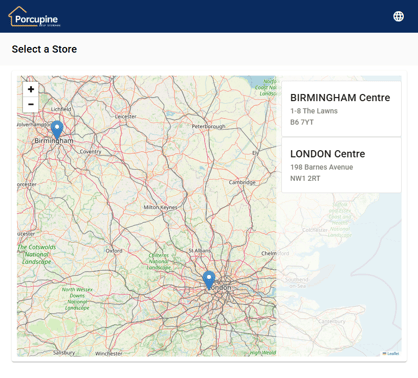
- Begins on a Select a Store page, with a map showing the customer where the sites are located.
- Continues to a Size Selection page, where the customer may choose to Reserve or Book (to create a contract) for a Size with available units on the selected site.
- If they chose to Book, they would then select an insurance plan for their unit and be shown available Hire items that they may add to their basket.
- They are then shown available Sale items that they may add to their basket.
- The customer will then be asked to register a new account for Spaceman Portal using their email address, or to login with an existing account if they are a returning customer.
- On the checkout page, they must Accept the Terms & Conditions, review their basket,
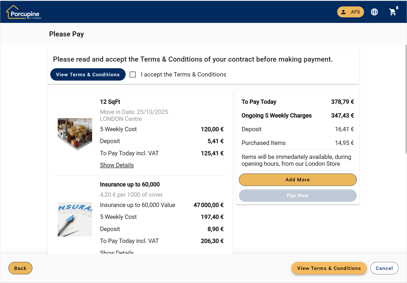
and Pay for it through Stripe. - A Contract signature request is sent by email to the customer through Signable, and once submitted, the signed contract will be saved within the Contract’s attachments upon a Signable update.
- Finally, they are taken to Spaceman Portal, to view their contracts, reservations, and transactions.
Spaceman Portal
Let your customers manage their accounts online
Spaceman Portal allows your new and existing customers to manage their storage accounts online.
Configurations are available to give your customers as much access to their account as you feel is necessary, as well as theming controls to match your company’s colours.
Spaceman Portal functionality is as follows: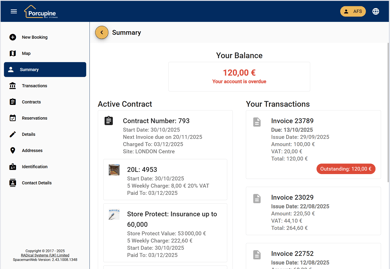
- On login, customers land on their account summary page. Here, they can see an overview of their account, displaying their most recent transactions, active contracts or reservations and account status.
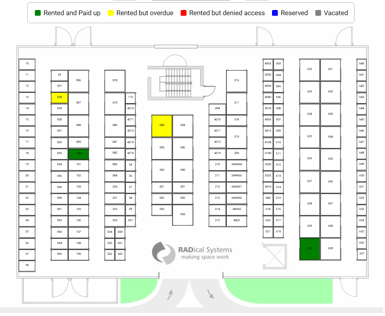
- Map. Customers can view the site map, as configured in Spaceman Desktop to clearly see which units they have rented or reserved and the status of that unit.
- Contracts. Customers can view all their active and vacated contracts, see the details of
each contract such as unit number, their insurance and hire items, as well as all transactions associated with that particular contract. They can also view their signed contract PDF if imported from Signable. - Reservations. Customers can view a summary of their existing and lapsed reservations, with the option to cancel reservation if allowed. Reservations can be made from Spaceman Shop.
- Transactions. Customers can view all their transactions, and have the option to view only those that are outstanding.
- Pay outstanding invoices via Stripe
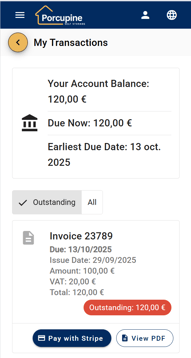
- View transaction as PDF
- Pay outstanding invoices via Stripe
- Details. Customers can view and update their personal details, their address, contact information and identification types, if allowed.
Want to know more about Spaceman Shop & Portal? Contact us!
+44 (0)1483 238730 | support@radicalsys.com